Mutual Settlements
This document is a translation of Mutual Settlements in English. In case of conflict between the Russian version of Mutual Settlements and this translation - only the Russian version of Mutual Settlements is legally binding. The Russian version of Mutual Settlements can be found here: https://yandex.ru/legal/partner_settlemets/?lang=ru.
1. With Individuals
Individuals are residents of the Russian Federation may enter into an agreement with Yandex for connecting their website to the Yandex Advertising Network.
The partner compensation is 45% of the cost of displaying advertising on the website. Yandex withholds the personal income tax (13%) from accrued compensation and pays it to the budget of the Russian Federation.
Compensation may be paid in two ways. An accrued amount may be transferred to the recipient’s settlement account or to an electronic wallet with Yandex.Money (https://money.yandex.ru).
In both cases an individual needs to make a written agreement with Yandex.
Upon completion of the form, an individual needs to send to Yandex electronic copies (scanned or photographs) of the following documents:
passport (a spread with the picture and a page with registered address);
TIN certificate (a copy of notification of registration with tax authorities is not acceptable);
pension insurance card (Pension Fund of the Russian Federation).
Upon receipt of document copies, Yandex sends out the standard agreement. The agreement needs to be printed in two copies, signed and sent to Yandex by mail or brought to the Moscow office. Yandex signs both copies of the agreement and returns one to the partner.
Details required for agreement execution:
full name;
date of birth (an agreement may be signed only with a resident of the Russian Federation over 18 years of age);
passport details;
taxpayer’s identification number (TIN); to obtain a TIN certificate please contact a tax office (http://maps.yandex.ru/?text=%ED%E0%EB%EE%E3%EE%E2%E0%FF+%E8%ED%F1%EF%E5%EA%F6%E8%FF) at the place of your residence;
pension insurance card number (Pension Fund of the Russian Federation); to obtain a certificate please contact a pension fund office (http://maps.yandex.ru/?text=%D0%BF%D0%B5%D0%BD%D1%81%D0%B8%D0%BE%D0%BD%D0%BD%D1%8B%D0%B9%20%D1%84%D0%BE%D0%BD%D0%B4) at the place of your residence;
actual and registered address (permanent registration by place of residence in the Russian Federation is mandatory).
Execution of Agreement with the Bank Payment Option
Upon execution of an agreement with the bank payment option, a partner shall submit to Yandex its bank details for receiving compensation:
BIC — bank identification code of the receiving bank according to the BIC RF Reference Book.
Bank name — filled in automatically if the receiving bank’s BIC is correct. In case of Sberbank, please include office description and number.
Correspondent account — account of a bank opened with a bank in Russia used for direct settlements between banks. Filled in automatically if the receiving bank’s BIC is correct.
Settlement account — a bank account through which the account holder shall perform all settlements involving bank’s participation. The settlement account is used for keeping funds and cashless transfers. The number contains 20 symbols starting with 40817... or 423...
Note
We must have a settlement account number (with 20 digits) to make payments. We are not able to make payments, account payment documents of which require any additional information (for instance, card number, subsidiary account number or Telebank number).
Personal account (only for Sberbank) — an account opened by Sberbank for settlements with certain individuals. The account number has 20 symbols.
To obtain or update your bank details, please contact the bank that maintains the partner bank account.
Execution of Agreement with Yandex.Money Payment Option
Following the link to the corresponding payment method, please type in the electronic wallet number.
You can switch to receiving payments through Yandex.Money in the settings at the «Payment Details» page (http://partner.yandex.ru/registered/?cmd=settings_company_details) by clicking on «Switch to payments through Yandex.Money».
Note
This payment option is available only to partners with «identified» (https://money.yandex.ru/security/identification) wallets.
Partner Remuneration Payment Procedure
Remuneration to individuals shall accrue on a monthly basis in rubles based on the total monthly price of advertising on the website.
At the beginning of each month, at the partner interface in Yandex Advertising Network a report containing the following information becomes available at «Financial Documents» tab:
cost of website advertising;
partner remuneration amount.
Remuneration is paid to the partner’s account on the 20th day of the month following the reporting period.
Upon request of partners (individuals) that signed an agreement with Yandex, in the beginning of the year, a 2-NDFL certificate can be issued for the previous year.
Note
Partners can work with Yandex Advertising Network through a Partner Service Center (https://yandex.ru/legal/partner_settlements/#4). In such case, the mutual settlement procedure is determined by the PSC.
2. With Legal Entities and Individual Entrepreneurs
Legal entities and individual entrepreneurs may enter into an agreement with Yandex for connecting their websites to the Yandex Advertising Network.
Agreement Execution
The agreement is sent electronically to an e-mail address provided upon registration. Please read the agreement carefully. A partner sends the signed agreement to Yandex in two copies by mail or with a courier. A completed agreement form and additional agreements are always available in the Documents section of the partner interface.
To accelerate the process of connecting your website, please send the signed copy of the agreement first by fax or electronic mail, followed with the original.
Contacts:
fax: +7 (495) 739-7070 (documents must include a note «Yandex Advertising Network»). Please make sure your fax has been successfully received by calling +7 (495) 739-7000.
e-mail: invoice@yandex-team.ru (documents must include a note «Yandex Advertising Network»).
address: 119021, Russia, Moscow, 16 Leo Tolstoy Street, Yandex LLC, Processing Department, Yandex Advertising Network. Map (http://company.yandex.ru/inside/contacts.xml).
Yandex Payment Details:
YANDEX LLC
16 Leo Tolstoy Street, Moscow, Russia 119021
TIN / KPP 7736207543 / 770401001
settlement account 40702810500001400742
with Raiffeisenbank (CJSC), Moscow
c/a 30101810200000000700, BIC 044525700
Partner Remuneration Payment Procedure
Payments to legal entities and individual entrepreneurs can be made only to partner settlement accounts.
Payments are made on a monthly basis based on an invoice issued by a website owner according to the bilateral Service Acceptance Report.
At the beginning of each month, Yandex sends out information regarding payments for the previous period. The letter includes a completed work acceptance report and contains the following information:
amount payable,
documents required for payments,
contact details for sending documents,
payment details of Yandex LLC.
Payment documents may also be downloaded in the Documents section of the partner interface. At the beginning of each month, acceptance reports for the previous period are also available in the Documents section.
Note
If you cannot guarantee delivery of original documents by the 13th day of the current month, we can make payments based on their fax (or scanned) copies provided that no amounts are due under original documents for all previous periods. You must send original documents by mail.
3. With Non-Residents of the Russian Federation
Legal entities that are non-residents of the Russian Federation may enter in an agreement with Yandex for connecting their websites to the Yandex Advertising Network.
Agreement Execution
For an agreement with a non-resident, a certificate of residency issued by an authorized body of the country where such legal entity is a tax resident, is to be submitted to Yandex. Regarding other aspects, the agreement execution procedure is identical to that for legal entities (https://yandex.ru/legal/partner_settlements/#2).
Mutual Settlements
All settlements with non-residents are made in Russian rubles.
Mutual Settlements with Legal Entities – Residents of Ukraine
Ukrainian partners have an option of signing an agreement with the subsidiary company of Yandex in Ukraine (Yandex.Ukraine) for mutual settlements in Ukrainian hryvnias.
Agreement Execution
The agreement is sent electronically to an e-mail address provided upon registration. Please read the agreement carefully. The signed agreement, copies of the state registration certificate, VAT payer certificate (if available), single tax payer certificate and a payment receipt (if available) shall be sent by a partner to Yandex.Ukraine in duplicate by mail or with a courier.
To accelerate the process of connecting your website, please send the signed copy of the agreement first by fax or electronic mail, followed with the original.
Contacts:
fax: +3 (8048) 737-44010, ext. 6665 (documents must include a note «Yandex Advertising Network»). Please make sure your fax has been successfully received by calling +3 (8048) 737-4410.
e-mail: info@yandex-team.com.ua (documents must include a note «Yandex Advertising Network»).
address: 4-D Shevchenko pr., office 55, Odessa, 65044, Ukraine, Yandex.Ukraine LLC, Yandex Advertising Network. Map (http://company.yandex.ru/inside/contacts-ua.xml).
Mutual Settlements with Legal Entities – Residents of the Republic of Belarus
Belarus partners have an option of signing an agreement and conducting settlements in Belorussian rubles with TUT.BY, Yandex’ s partner in Belarus (http://tutby.com/service/yandex).
Agreement Execution
A letter with the name of the company, details and addresses of a website (websites) with a code of the Yandex Advertising Networks needs to be sent to cop@tutby.com for agreement execution.
Regarding signing an agreement and conducting mutual settlements: e-mail: cop@tutby.com, telephone: +375 (17) 239-57-01.
Note
If you cannot guarantee delivery of original documents by the 13th day of the current month, we can make payments based on their fax (or scanned) copies provided that no amounts are due under original documents for all previous periods. You must send original documents by mail.
4. Through the Partner Service Center (PSC)
Note
To ensure security of your account, please do not use the same login and passwords as the ones you use to access Yandex services.
Remuneration to a partner accrues only during a period when such partner has an effective agreement with Yandex or effective relations with a PSC.
Remuneration can be received only at the PSC where it accrued.
The procedure of mutual settlements is determined by the PSC. With any questions regarding mutual settlements please contact your Partner Service Center.
PSC Selection
A partner can connect a website to the Yandex Advertising Network through a partner service center (PSC). In such case, one of the following PSCs needs to be selected:
MixMarket partner network (MixMarket.biz) (http://www.mixmarket.biz/doc/partners/yd),
Profit-partner.ru (http://profit-partner.ru),
AdSelf (http://www.adself.ru),
E-Customer (http://www.e-customer.ru).
Regional PSCs for legal entities:
Yandex.Ukraine
TUT.BY (Belarus) (http://tutby.com/service/yandex).
For detailed information about each PSC, please see their websites.
Connection through a PSC
To connect a website to the Yandex Advertising Network through a PSC, please follow the link Select the Service Center in the partner interface of the Yandex Advertising Network, choose your center and press «Select». After that you must complete registration in the interface of the partner service center.
If the status is «Awaits Confirmation of Registration from PSC» for over one day, it means you have not completed the registration procedure at the PSC. To complete registration use the link with the name of selected PSC (in the right upper corner) in the list of sites and register in the partner service center interface.
Simultaneous Use of PSC and Advertising Network Interface
Partners can manage the site through a PSC and at the same time use the Advertising Network interface. Available sites need to be connected to Yandex login. No moderation and password change is required. When a PSC and the Advertising Network interface are used simultaneously, statistics is not lost, and payments are made through the PSC.
To manage a site through the Advertising Network interface, a PSC partner shall:
1. Fill in the form (http://partner.yandex.ru/registered/?cmd=campaign_add) of the Advertising Network partner indicating the form of operation through a PSC. An existing or new Yandex login may be used.
2. Add the site (http://partner.yandex.ru/registered/?cmd=campaign_add). Upon adding, mark «I would like to add an existing site to my Yandex login». Enter the site domain and id.
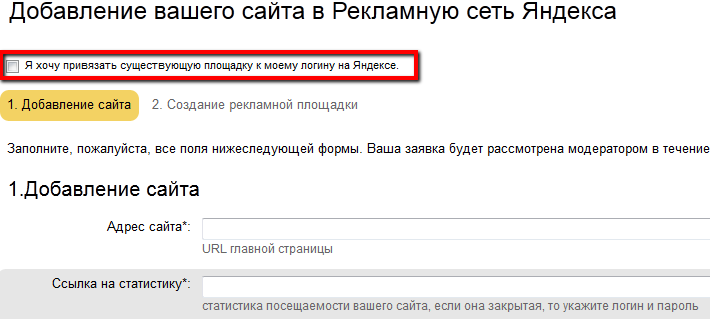
3. Confirm that you are the owner of the site through the Webmaster service (http:///webmaster.yandex.ru). Confirmation methods are described in detail in the Help section of the Webmaster (http://help.yandex.ru/webmaster/?id=995300).
In case of successful confirmation, the site will be transferred and will appear in your list of sites. For sites already connected to your login through Webmaster, confirmation is done automatically.
If for any reasons the rights to a website have not been verified successfully, an application with incomplete site transfer will appear in the site list. You can continue or cancel the site transfer.
Transition to Working Directly with Yandex
Partners of the Yandex Advertising network working through a PSC can switch to working directly with Yandex without registering a new account or changing the advertising access code.
Click «Change Service Center» on the My Sites page
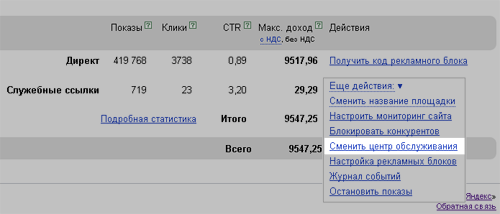
and choose the option «switch to working directly with Yandex». Fill in the form of Yandex Advertising Network partner indicating as form of cooperation «Legal entities directly with Yandex» (https://yandex.ru/legal/partner_settlements/#2) or «Individuals directly with Yandex» (https://yandex.ru/legal/partner_settlements/#1).
PSC change
To change the partner service center (PSC) for a site use the link «PSC change» in the partner interface, select one of listed PSCs and click «Delegate». After that you must register with the PSC interface if you do not already have an account with them and obtain authorization.
5. List of Links
List of links published at a partner website in addition to advertising materials, for placement of which remuneration is paid.
Links to Yandex.Direct advertising block:
«All advertisements»